
Zendesk Jira Integration: Building a Ticket Escalation Process That Works
Neal Travis · · 9 minutes read

Most support teams set up a Zendesk Jira integration for one reason: they want engineering to see the tickets that need a real fix without support having to leave Zendesk to ask for it.
The integration handles that part well.
What it doesn’t solve is everything that happens after the Jira card gets created:
- Who’s responsible for keeping the customer updated.
- What an agent is supposed to do when the engineer working the issue never opens Zendesk again.
- How anyone tells a ticket that’s quietly moving from one that’s gone quiet for weeks.
That gap is usually where an escalation stalls, because linking two systems isn’t the same as designing a process for how people work across them.
A recent thread in the Support Driven community made that clear: half a dozen support leaders, coming from different companies and different backgrounds, independently converged on the same basic shape for solving it.
In this article, we’ll cover how the Zendesk Jira integration works, what tier 3 support should verify before anything reaches engineering, what belongs in a bug report template, how to keep a Zendesk ticket current when Jira comments don’t sync back automatically, and where Slack fits as the fast lane between the two systems.
Support stays in Zendesk and owns the customer relationship. Engineering stays in Jira and owns the fix. The escalation process is what keeps that division from turning into an information black hole on either side.
How the Zendesk Jira Integration Works?
Zendesk’s native Jira integration links a Zendesk ticket to a Jira issue and lets each side see the other’s status without switching tools. Once connected, a support agent can create or link a Jira issue from inside a ticket, and a developer can see the linked ticket’s details, including the customer conversation, from inside Jira.
The optional field syncing feature goes a step further: it pushes updates like priority, status, and due date between the two systems in near real time once you’ve mapped compatible fields on both sides.
A developer marking an issue “In Progress” or “Done” in Jira updates a field on the Zendesk ticket automatically, with nobody copying and pasting a status by hand.
Here’s the part that catches teams out: comments don’t sync back.
An engineer can read the full Zendesk conversation from inside Jira, but anything they write there — findings, questions, a fix confirmation — stays in Jira unless someone carries it over manually.
Zendesk documents this as a known limitation, not a setting you’ve missed, so the fix has to be procedural rather than technical: someone on the support side copies the key updates back into the Zendesk ticket by hand.
Later in this article, we’ll cover how to turn that into a habit rather than an afterthought, using On-hold status and a set review cadence.
What Tier 3 Support Should Verify Before Escalating?
Every working version of this process starts the same way: nothing reaches engineering until someone has verified it.
That’s a hard requirement, not a nice-to-have: issues are fully investigated and triaged before an engineer sees them, and engineering has everything it needs to start work without a first round of clarifying questions.
This step is what keeps a tier 3 support escalation from turning into an unpaid triage service for engineering. Before a ticket leaves Zendesk, tier 3 should be able to answer:
- Is this reproducible? Not “the customer says it happens,” but a support agent has seen the behavior.
- Is it already known? Check for an existing Jira issue or a documented workaround before creating a duplicate.
- What’s the actual impact? One customer hitting an edge case is a different priority than a bug affecting every account on a plan.
- Does this need engineering at all? Some “bugs” turn out to be a missing macro, an unclear policy, or a support gap, not a code fix.
Swifteq’s Ticket Classification app for Zendesk can front-load part of this check: it tags incoming tickets as bug reports, how-to questions, or account issues before a human opens them, so no one on your team is starting from scratch.
In my experience at AIHR, the escalations that stalled longest were the ones that skipped this reproduction step: an agent forwarded exactly what the customer said instead of investigating and providing all the real context engineering needs.
Without that work, the engineer picking it up spends the first day doing that work themselves. A ticket that arrives already prepared moves fast. One that arrives as a raw complaint sits until someone has time to make sense of it, and that wait hurts the customer.
What Belongs in a Zendesk Jira Bug Report Template?
Once a ticket is verified, how it’s written up decides whether engineering can act on it immediately or has to send it back. A Zendesk macro that enforces the format so the same information shows up the same way every time is worth the setup effort.
A workable bug report template needs:
- A clear description of what’s wrong, written for someone who’s never touched the customer’s account.
- Exact reproduction steps, numbered, not summarized.
- Logs, screenshots, or session recordings that show the behavior directly instead of describing it secondhand.
- Expected behavior versus actual behavior, stated separately so there’s no ambiguity about what “wrong” means here.
- Customer impact: how many accounts, how severe, and whether a workaround exists in the meantime.
Getting agents to fill this in consistently, under time pressure, is the hard part.
Atlassian’s 2025 Developer Experience Report found developers lose 10 or more hours a week to organizational inefficiencies, finding information and switching context chief among them.
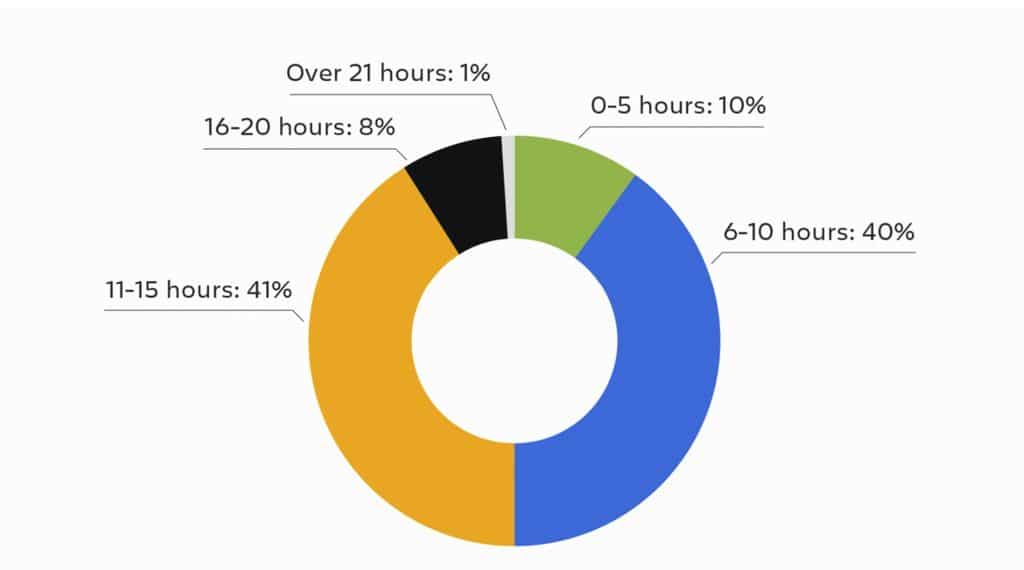
Source: Atlassian
A vague bug report is exactly that kind of interruption: it turns one ticket into a round trip of questions before any fix work starts.
Zendesk apps like Ticket Parser Autofill make this easier. It reads the ticket conversation and auto-populates your custom fields, repro steps, environment details, and more, using rule-based parsing for structured formats and AI parsing for the messier detail customers describe in their own words.
The template still needs a human to confirm it’s accurate, but the agent isn’t retyping the same five fields from scratch on every escalation.

The other half of this is giving engineering the right to push back. A “more info needed” status in Jira lets engineers send a ticket back with what’s missing instead of quietly parking it or doing the investigation themselves.
That right is what makes the template worth enforcing. Without it, a bad template just means engineers do the triage work anyway, later and slower.
Keeping the Zendesk Ticket Updated When Jira Doesn’t Sync Back
That manual bridging job belongs to support, not engineering.
Keep the Zendesk ticket in On-hold status while it waits on a linked Jira issue, and drop a link to the internal discussion thread in a Zendesk comment, so anyone picking it up later has the full trail in one place.
What prevents tickets from going stale is the review cadence: on-hold tickets need checking on a schedule, not just when a customer follows up.
Keep the latest Jira update summarized in the most recent Zendesk comment, so an agent can hover over a ticket in their On-hold view and see current status without opening it. If a linked Jira issue hasn’t moved in a set number of days, the agent’s job is to ping the engineer directly rather than let it sit.
At any real ticket volume, “check your On-hold tickets” breaks down fast if agents can’t find the ones that need attention.
This is where Advanced Search Plus earns its place: build a saved view filtering on-hold tickets by a “linked Jira issue” custom field and days since last update, and the review becomes a five-minute scan instead of clicking into every open escalation.
Using Slack for Efficient Zendesk-Jira Escalation Handoffs
Not every escalation needs a Jira ticket immediately. For many support teams, Slack is frequently where the decision gets made
Two patterns work well here, and both fit different team structures:
The first uses two Slack channels: one where support discusses and verifies an issue internally, and a second, more formal channel where verified issues get raised to engineering using a template.
Engineering commits to a Service Level Agreement (SLA) on that second channel, here a one-day first response and a two-day follow-up, so support isn’t left guessing whether anyone’s seen it.
The second approach skips a dedicated engineering channel entirely: tier 1 and tier 2 use Slack informally for internal guidance, but a verified tier 3 issue goes straight into Jira through an automated form, and engineering reviews new tickets at a recurring triage meeting.
With this approach, Slack stays fast and informal for support’s own questions; the formal handoff happens entirely in Jira.
Which pattern fits depends on how your engineering team already works. If they live in Slack and expect real-time pings, build the second channel and attach an SLA to it. If they run a structured backlog and prefer async intake, skip the extra channel and put the discipline into the Jira ticket and the weekly review instead.
What both patterns share: Slack decides whether something needs escalating. Once it does, tracking moves to the Zendesk ticket and the linked Jira issue.
Setting Up Your Ticket Escalation Process: a Practical Checklist
If you’re building this from scratch, here’s a working order:
- Turn on the native Zendesk-Jira integration and set up field syncing for priority, status, and due date so updates move automatically.
- Define what “verified” means for tier 3 before anything gets escalated: reproduced, checked against known issues, and scoped for impact.
- Build your bug report template as custom fields, not a paragraph in the description box, so it’s consistent and searchable later (more on structuring Zendesk ticket fields well).
- Set up Ticket Parser Autofill, or an equivalent macro, to pre-fill that template from the ticket conversation, so agents are confirming information instead of typing it from scratch.
- Agree on engineering’s right to bounce a ticket back marked more info needed, and put it in writing so it doesn’t feel personal.
- Standardize your On-hold workflow: link the discussion thread in a Zendesk comment, and set a rule for how many days of silence triggers a follow-up ping.
- Build a saved search for stalled On-hold tickets, filtered by your linked-Jira custom field, so reviewing them is a scheduled five-minute task instead of a manual hunt.
- Decide where Slack fits, if at all: a dedicated engineering channel with an SLA, or a direct-to-Jira intake with a recurring triage meeting, and write down which one you’re using.
Optimizing the Zendesk Jira Integration for Efficient Escalations
None of what I’ve described above requires an expensive or hard-to-implement tool.
The teams getting it right are using the same Zendesk Jira integration everyone has access to.
What separates a working process from a stalled one is triage before escalation, a template engineering can act on immediately, and a review cadence that doesn’t wait on the customer to surface a stalled ticket.
Support owns the customer conversation. Engineering owns the fix. Get the handoff right, and neither side has to guess what the other one is doing.
If you’re using Zendesk, Swifteq has apps built for exactly this kind of handoff, from auto-populating your escalation template with Ticket Parser Autofill, classifying tickets before they reach tier 3 with Ticket Classification, to finding stalled tickets with Advanced Search Plus, to giving AI tooling scoped access to your Zendesk data with the MCP Server.

You can schedule a demo today to see exactly how they work, or start your own free 14-day trial, no credit card required.