Swifteq

Document Parser OCR for Zendesk

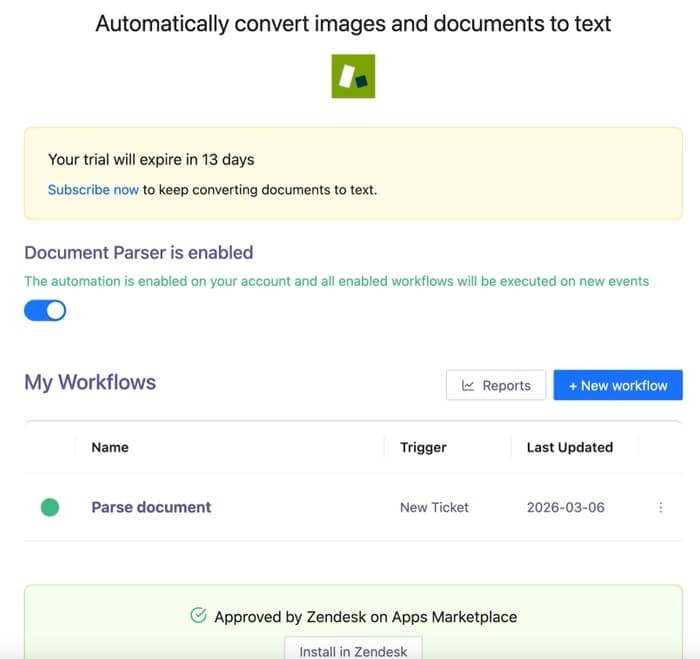
Convert ticket PDFs and images into searchable, actionable text. Stop opening attachments and retyping document data into Zendesk. Swifteq Document Parser OCR uses OCR and AI to extract text and key details from PDFs, scans, and images, then adds them to tickets as internal notes or fills custom fields automatically. Agents get the details instantly, without switching tools or copying data.

  • Automatic OCR for PDFs, images, and scans
  • Extract text and insert it as internal notes
  • Auto-fill ticket fields with structured document data
  • One app for OCR + AI extraction inside Zendesk

FREE 14-day trial, no credit card required. Pricing starts at €99/month.

Trusted by

Trusted by Support Teams Worldwide

Join companies who use Swifteq to scale support without adding headcount.

  • Primrose
  • Trade Republic
  • Hotjar
  • Engine Yard
  • Seesaw

Automatic OCR Text Extraction

Turn attached documents into readable text instantly

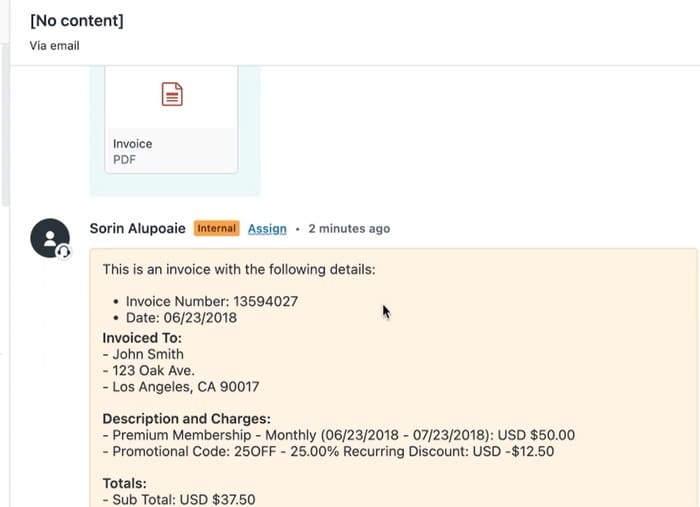
As soon as a ticket is created or updated, the app scans attached PDFs and images and converts them into searchable, readable text.

That means agents no longer need to open files manually just to understand what a customer sent.

Automatic OCR text extraction

Insert Extracted Text as Ticket Comments

Show document content directly inside the ticket

The full extracted text can be added automatically as an internal note, so agents can review document content without opening the attachment.

This speeds up handling time and keeps all relevant information in one place.

Insert extracted text as ticket comments + all in 1- Zendesk Document Parser OCR

Smart Field Autofill

Populate the right fields automatically

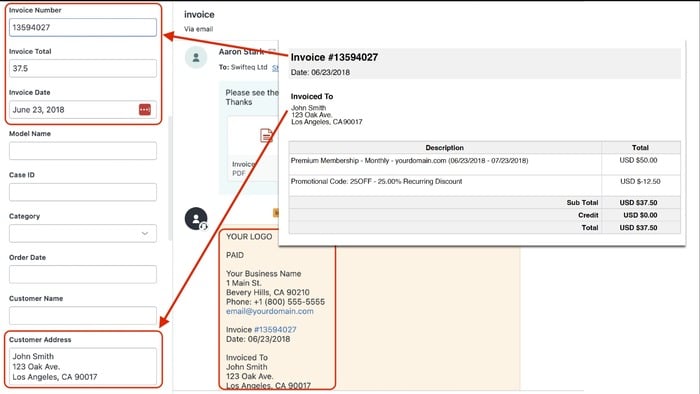
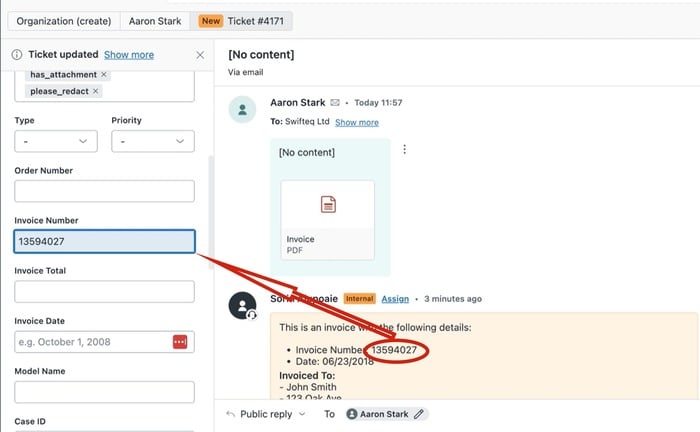
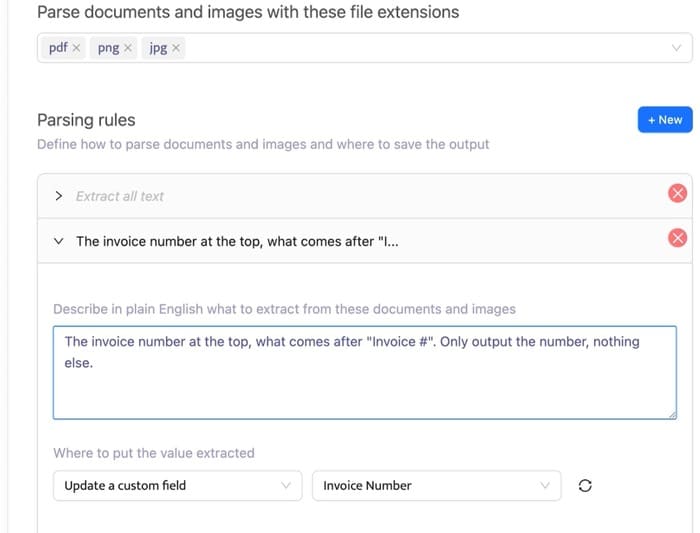
Choose what data you want to capture, such as invoice numbers, customer IDs, addresses, dates, and more. The app then fills the matching Zendesk custom fields for you.

This reduces manual entry, improves consistency, and keeps workflows moving faster.

Smart field autofill - Zendesk Document Parser OCR

AI-powered Data Recognition

Extract structured data from complex documents

AI helps the app recognize and pull key information from documents like invoices, shipping labels, medical forms, and contracts.

So even when layouts vary, your team still gets the data they need without manual review.

AI-powered data recognition

All-in-one Solution

One app instead of a patchwork workflow

There is no need for separate OCR tools, extraction apps, or fragile workarounds. This app reads documents and pulls the data you need in one place.

That means fewer moving parts, faster setup, and a cleaner support workflow.

Insert extracted text as ticket comments + all in 1- Zendesk Document Parser OCR

Flexible AI Extraction Rules

Choose the data you need without writing code

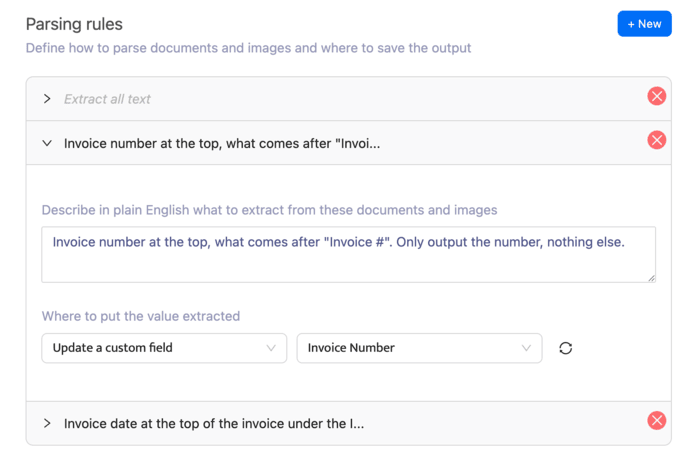
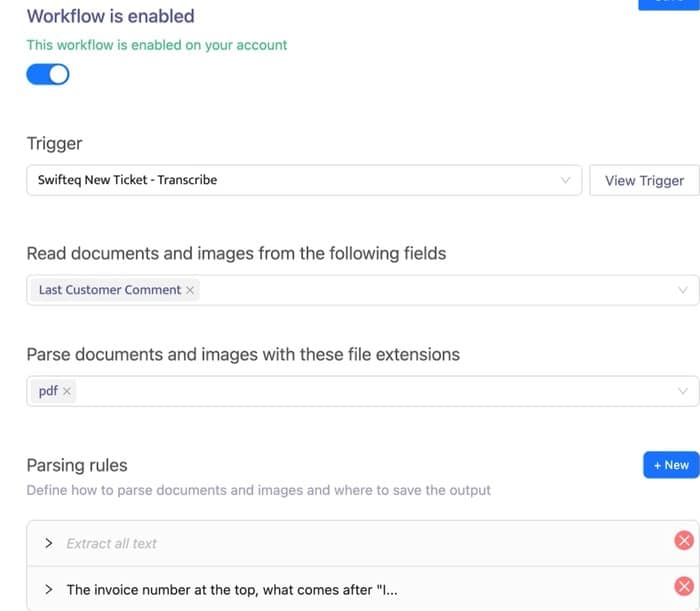
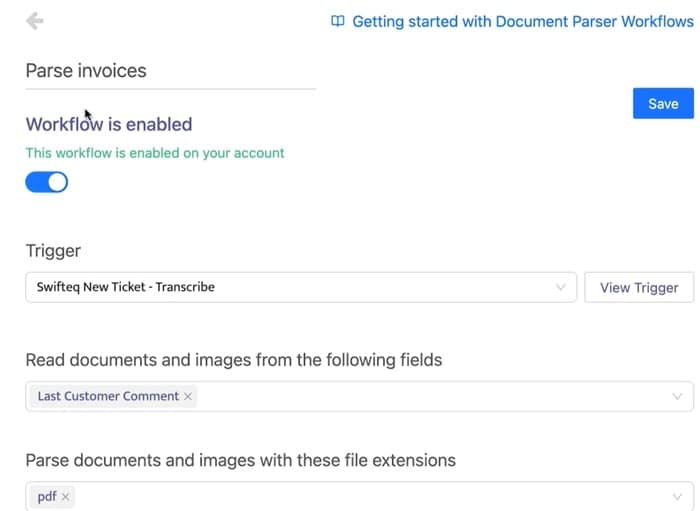
Define what to extract using simple instructions, then map that data to the right Zendesk fields.

It is a faster, more flexible way to automate document handling without developer support.

Flexible AI extraction rules

Zendesk Trigger Integration

Fit document processing into your existing workflows

The app works with Zendesk triggers, so documents can be processed automatically when tickets are created or updated.

This helps teams build hands-free workflows that scale without extra effort.

Zendesk trigger integration

Real-time Processing

Have document data ready before agents open the ticket

Documents are processed automatically as tickets arrive, so extracted text and key data are already available when agents start working.

This reduces delays and helps teams resolve requests faster from the first touch.

Real Time Processing

Secure and Reliable

Automation you can trust with sensitive documents

The app is built with security as a priority, helping teams process attachments reliably while supporting strong data handling standards.

That gives you a safer foundation for scaling document automation in Zendesk.

Secure and reliable

Benefits Your Support Team Can’t Afford to Miss

Eliminate Manual Data Entry

Stop copying details from attachments into ticket fields – OCR + AI handles it instantly.

Faster First Response Times

With key data extracted and fields populated upfront, agents can respond and resolve faster.

Make Attachments Searchable

Find tickets by searching for text that used to be locked inside PDFs and images.

Customers

Real Results from Real Teams

★★★★★
“This is a great MCP server. It perfectly and simply does what we need it to do. Total Game Changer for our workflow, worked perfectly and we are now expanding our use of it.”
Travis DawsonVP Product and Business, Complex NTWRK
★★★★★
“Works great! Total game changer for handling support. Recommend this for everyone that uses Zendesk.”
Ole André BakkenCEO, Kréatif
★★★★★
“The MCP Server has been very useful, allowing us to pull Zendesk tickets for external analysis and the tracking of incident vs device register. Integrates very easily with Claude and functionality has been great.”
Tom FossTechnical Engineer, Acova

Integrates seamlessly with

Zendesk Support

The Zendesk Document Parser OCR app built to automatically extract text and key data from ticket attachments and eliminate manual document handling.

Demo

Schedule a Demo!

Ready to improve your support workflows? Let us show you what Swifteq can do.

1 demo CTA

Also from Swifteq

Clients Using Swifteq Document Parser OCR Also Use

Zendesk Automation Apps

Agent Co-writer

Write better Zendesk support replies in seconds with AI. Generate on-brand responses, summarize long tickets, dictate replies, and translate messages directly in Zendesk, helping agents respond faster and more confidently. Pricing starts at €9/agent/month.

Find Out More

Ticket Parser Autofill

Automatically extract key data from Zendesk ticket comments and populate fields instantly. Simplify workflows, reduce manual input, and save your support team valuable time. Pricing starts at €59/month.

Learn More about Ticket Parser Autofill